Skip to content

Use case · Investment Banking & M&A

Pitch books and IC memos, built inside PowerPoint

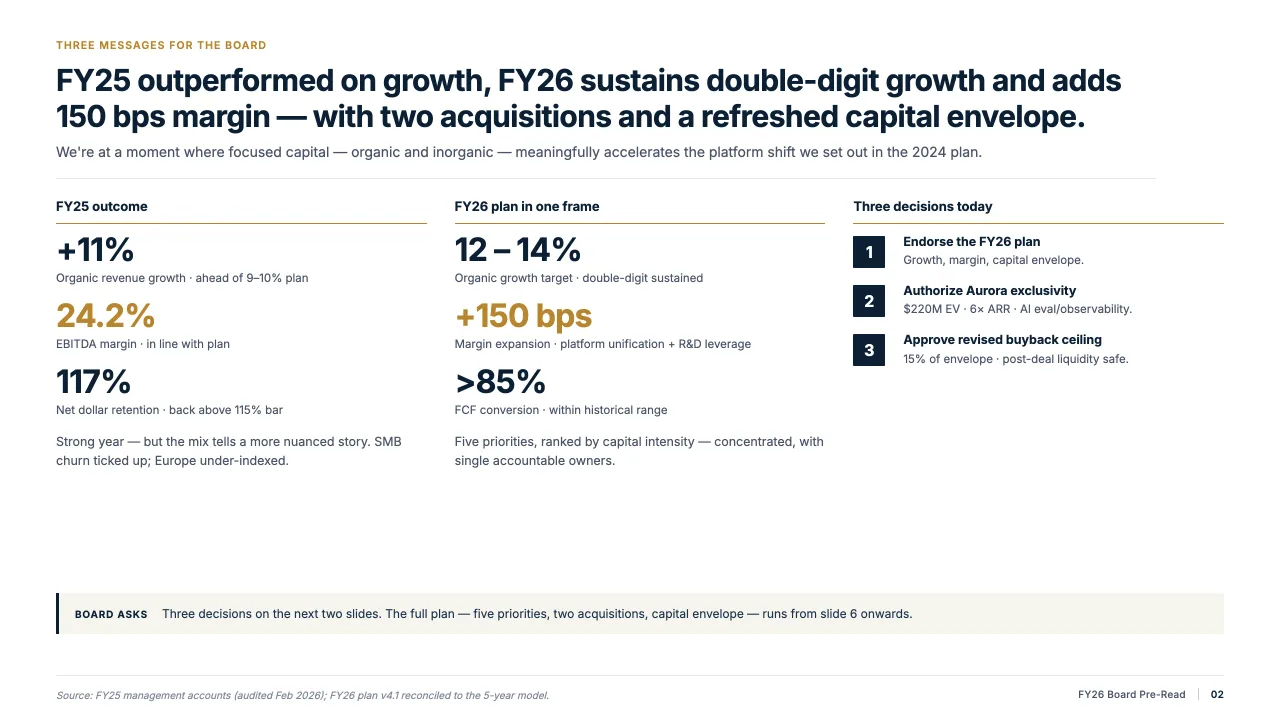
Decky AI runs as a PowerPoint add-in and handles the mechanical work of investment banking decks – formatting, alignment, brand compliance, and content consistency – so your team focuses on the deal, not the pixels.

Last updated:

Why banking decks take so long

Investment banking is defined by tight deadlines. A pitch book that needs to be on the MD's desk by 6 AM, a CIM that has to go out before market open, an IC memo due the same day as the site visit. The analysis is done – but someone still has to build the slides.

Most banks rely on analysts and associates to spend hours aligning text boxes, reformatting charts from Excel, and chasing house-style compliance. Decky AI eliminates that entirely – working directly inside the deck, in real time.

50%+

Reduction in slide production time for proposals and pitch books

Hours

Saved per deck on formatting, alignment, and brand compliance

Same day

Turnaround on IC memos and CIMs with Decky AI

What Decky AI automates in banking decks

1

Instant brand and house-style enforcement

Decky applies your firm's color palette, font hierarchy, table styles, and logo placement across every page of the deck in seconds. Works for any house style, including custom templates.

2

Pull financials from Excel into slides

Point Decky at your financial model – it extracts the right numbers, formats them into on-brand tables and charts, and drops them into the correct slide. No more manual copy-paste from Excel into PowerPoint.

3

Generate first-draft transaction slides

Provide a deal brief, a target profile PDF, or comparable transaction data – Decky generates a first-draft section of the pitch book with logical narrative flow, headline messages, and structured content ready for the team to refine.

4

Consistency check across the entire deck

Before it goes to the MD or the client, Decky scans the whole deck for inconsistencies: numbers that don't match across slides, ticker symbols used differently, date formats that vary, or sections that contradict each other.

5

Fast turnaround on CIMs and management presentations

Decky is particularly effective for high-volume, time-pressured deliverables like CIMs and management presentations where the structure is known but the content population and formatting take hours of analyst time.

Banking deliverables Decky AI handles

Pitch Books

Buy-side and sell-side pitch books, including tombstone pages, league tables, team credentials, and transaction overviews.

Investment Committee Memos

IC memos with investment thesis, deal structure, risk factors, financial summary, and return analysis.

Confidential Information Memoranda

CIMs with executive summary, business overview, financial model outputs, and transaction process description.

Management Presentations

Company overview decks, roadshow materials, and lender presentations with consistent formatting throughout.

Fairness Opinion Materials

Valuation materials, financial analysis presentations, and board committee presentations.

Deal Process Documents

Process letters, bid instruction memos, and Q&A summaries formatted to house style.

Confidentiality by architecture

Deal confidentiality is fundamental in investment banking. Decky AI is built with that in mind: slide content is sent to EU-hosted LLM providers for AI processing, but is never stored — zero data retention by default. No model is trained on your materials. If you explicitly save a slide to your Slide Library, it is stored EU-hosted and private to your organisation, deletable at any time, and never used to train AI models.

  • Slides saved to the Slide Library are stored EU-hosted, private to your organisation, deletable anytime, and never used for AI training
  • Runs inside your existing PowerPoint – no separate app to install
  • GDPR-compliant, EU-hosted backend for tool features (web search, icon library)
  • Enterprise plans available with custom DPAs and IT review

Frequently asked questions.

Find quick answers about Decky AI. Reach out to us directly for more information.

Will Decky AI be trained on your slides or client data?
No. Decky AI is never trained on your slides, documents, or any client-related content. Slides are processed in real time to handle your request. If you choose to save a slide to your Slide Library, it's stored privately in our EU-hosted backend and is deletable at any time – but it is still never reused or added to model training.
Does Decky AI help with the content or only the formatting?
Beyond layout and design, Decky AI also checks your slide content for logic errors, typos, grammar issues, inconsistencies, awkward phrasing, and enforces style guidelines (e.g. consistent number formats, capitalization, citation style, tone).
How do I pull in data / integrate existing data sources for slides?
Decky AI supports data integration. It can connect to your company's knowledge sources (files and images) and fetch relevant facts, insights or supporting data for your slides from the web.
Can I generate slides from scratch using Decky AI?
Yes, Decky AI allows slide generation from scratch. You can start with just a topic, a rough outline, a document, or even plain notes, and Decky will generate a fully structured slide deck: with logical flow, headings, visual hierarchy, charts/visuals if needed, and design-ready formatting.
What is the Slide Library and how many slides can I save?
The Slide Library lets you save individual slides – with their layout, branding, and content intact – and reuse them in any future deck. Capacity scales with your plan: 20 saved slides on Free, 100 on Starter, and 200 on Pro and above. Enterprise teams additionally get a shared organisation library of up to 1,000 slides. Saved slides are stored EU-hosted, private to you or your organisation, deletable at any time, and never used to train AI models.
Which platforms and versions of PowerPoint does Decky AI support?
Decky AI is a native Office Add-in for Microsoft PowerPoint on Windows and macOS, installed through a Microsoft 365 subscription. There is currently no web or mobile version – the add-in runs inside the PowerPoint desktop application you already use.
What does Decky AI cost?
Decky AI has a free plan and five paid tiers. For individuals: Free (€0), Starter (€25/mo), Pro (€50/mo) and Max (€100/mo). For teams: Business (€199/mo) and custom Enterprise pricing. All paid plans include credits for slide edits, AI images, icon search and web search – see the full breakdown on our pricing page.
What are “credits” and how do I use them?
Credits meter the actions that call an AI model: 10 credits per slide created or edited in fast mode (20 in smart mode), 20 credits per AI-generated image, and 1 credit per icon or web search. Reading and planning actions inside the agent are always free.
How do I install Decky AI?
Individuals can install Decky AI directly from Microsoft AppSource and sign in inside PowerPoint. IT administrators rolling it out to a whole organisation instead upload the Decky AI manifest as a custom Integrated App in the Microsoft 365 Admin Center, so it's deployed to every assigned user automatically.
Can my whole team use Decky AI, with single sign-on and shared assets?
Yes. The Business and Enterprise plans support organisation-wide deployment via the Microsoft 365 Admin Center, Microsoft Entra ID single sign-on, role-based access control, and a shared organisation Slide Library of up to 1,000 slides.
Does Decky AI need an internet connection?
Yes. Decky AI calls a large language model to generate and edit slide content, so an active internet connection is required – there is no offline mode.
Where is my data processed, and is Decky AI GDPR-compliant?
Decky AI is built and operated in the EU. Enterprise customers can choose regional processing on Microsoft Azure or AWS infrastructure in the EU (Frankfurt) or US (Virginia). Slide content is never stored for training and is not retained by Decky AI after a request completes.
Do I need to leave PowerPoint or export my deck to use Decky AI?
No. Decky AI runs entirely inside the PowerPoint desktop app as a native Add-in. There's no separate editor, no browser tab, and no export/import step – every change is applied directly to the open .pptx file and can be undone like any other PowerPoint action.
Is there a free plan?
Yes. The Free plan costs €0 per month and includes 200 credits per month and a 20-slide Slide Library – enough to try Decky AI on real decks before upgrading.
How is Decky AI different from a general-purpose AI assistant like Microsoft Copilot?
Decky AI is purpose-built for slide production: it reads your deck's own slide master and layouts to apply your firm's brand automatically, checks content for typos, inconsistent formatting and broken citations, and keeps every change inside the native PowerPoint file – rather than being a general-purpose office assistant.

Talk to our sales team

Get a personal demo.

Discover the value of Decky AI for consultants and see how client-ready PowerPoint decks are created in minutes.