Consulting PowerPoint templates and AI: why static slides fall behind
Consulting PowerPoint templates give a strong start, then stay static. What Slideworks and others allow with AI, and how Decky AI adapts them to your master.
Consulting PowerPoint templates from Slideworks, Slide Science, Deckary and StrategyU give you real structures and a strong start. As files they stay static until someone edits them, and Slideworks’ terms bar using its service as input to outside AI tools without written permission. Decky AI includes templates and lets you adapt them to your content with AI, on your own master.
Vendor facts link to each vendor’s own page, read in November 2026. The tests used free samples, plus one paid pack. Names and logos belong to their owners.
What do consulting templates get right?
They package what experienced consultants already know: slide structures, frameworks and a fast first draft. You start from a page that already knows where the answer goes and which chart suits the comparison, so the first version looks like it came from someone who has done this before.
| Library | What you get | AI on top, per its own pages |
|---|---|---|
 Slideworks | 3,523 slides and 27 Excel files in the full bundle, also sold as separate topic templates. Says it is built by ex-McKinsey, BCG and Bain consultants. | Its add-in AI searches for better layouts or matching alternatives for a slide |
 Slide Science | 250+ slides, 1,500+ icons, 500+ maps and flags | A beta Claude skill builds slides from the pack |
 Deckary | 143 templates inside its add-in, plus four free decks | Its Premium plan adds an AI agent that creates slides and changes them on request |
 StrategyU | 123 slides in four styles, free including for client work | Sells an AI Skills pack |
 Flevy | A marketplace of 10,000+ documents from hundreds of authors | An MCP server lets assistants search its catalogue |
 TemplatePlan | Consulting decks sold individually on Gumroad | None stated |
Beside these sit the large general libraries, such as SlideModel, SlideTeam and SlideUpLift, which cover a wide range of topics, consulting included.
These are good products, and this is why Decky AI has templates too. Its Slide Library holds fillable templates and whole decks, and Components such as a 2x2 or a KPI row let you build a page up piece by piece. The trouble starts when your slide has to say something the template did not expect.
Why is a static template a problem once your story changes?
Because its shape was decided before your message existed. A static library’s answer is more variants, so you search for the closest slide and then rebuild it by hand. That worked when rebuilding by hand was the only option.
Take a template from our own library. World footprint map puts seven locations on a world map, with numbered pills, countries shaded by role and a table of shares beside it. It is built to say one thing: this organisation operates worldwide.
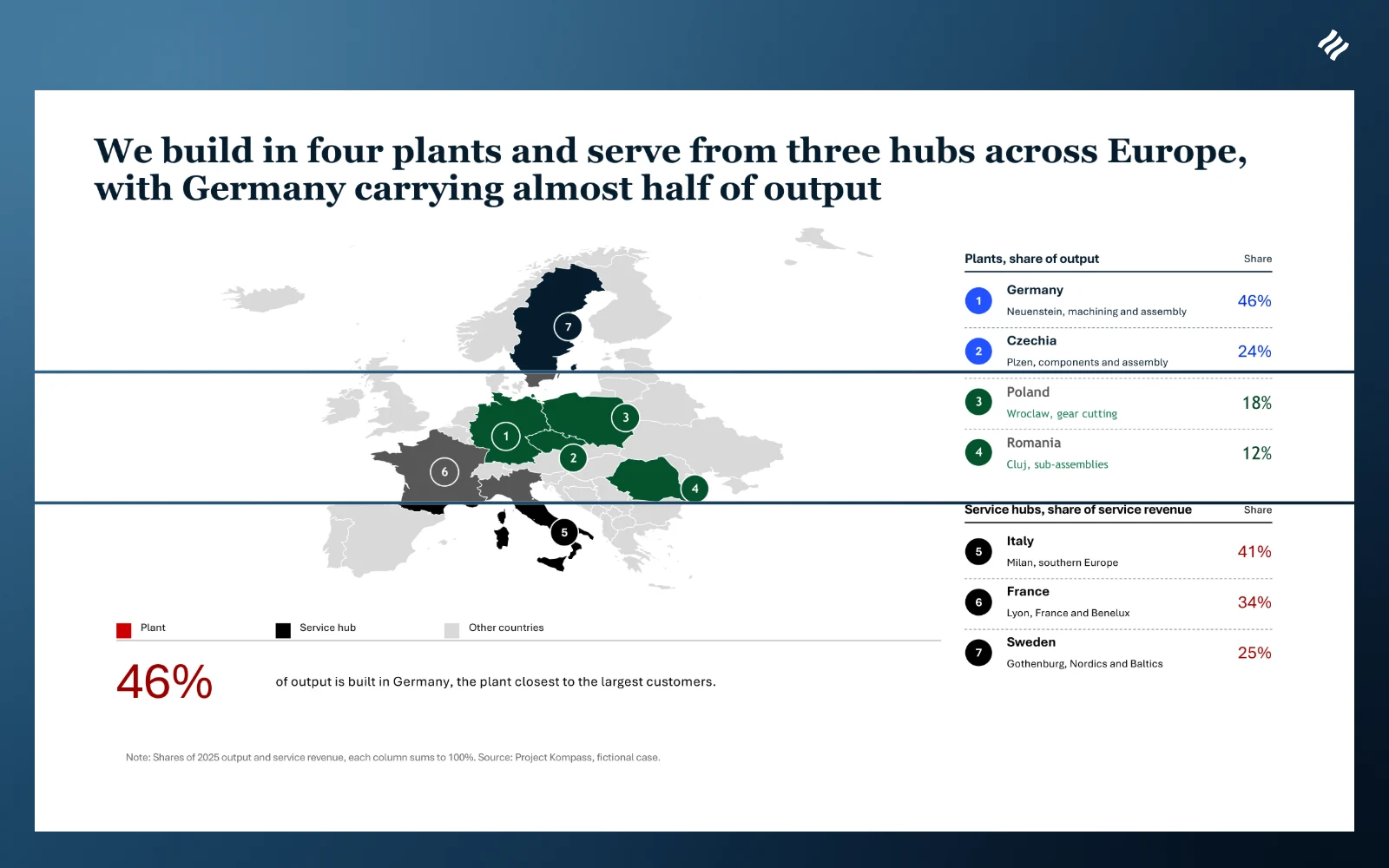
Now picture a steering committee on a fictional case, Project Kompass. Its four plants and three service hubs all sit in Europe, and on a world map they crowd into one corner. The template is nearly right, and its map is wrong. Asked in the chat, Decky AI changes it:
- The world map becomes a Europe map from Decky AI’s map assets, where each country is a native shape.
- Germany, Czechia, Poland and Romania turn blue as plants, and Italy, France and Sweden turn navy as service hubs.
- Each numbered pill moves onto its new country.
- The legend and table headers change with the story, and the rows take the new names and shares.
Drag the handle to compare the template as shipped with the slide Decky AI adapted.
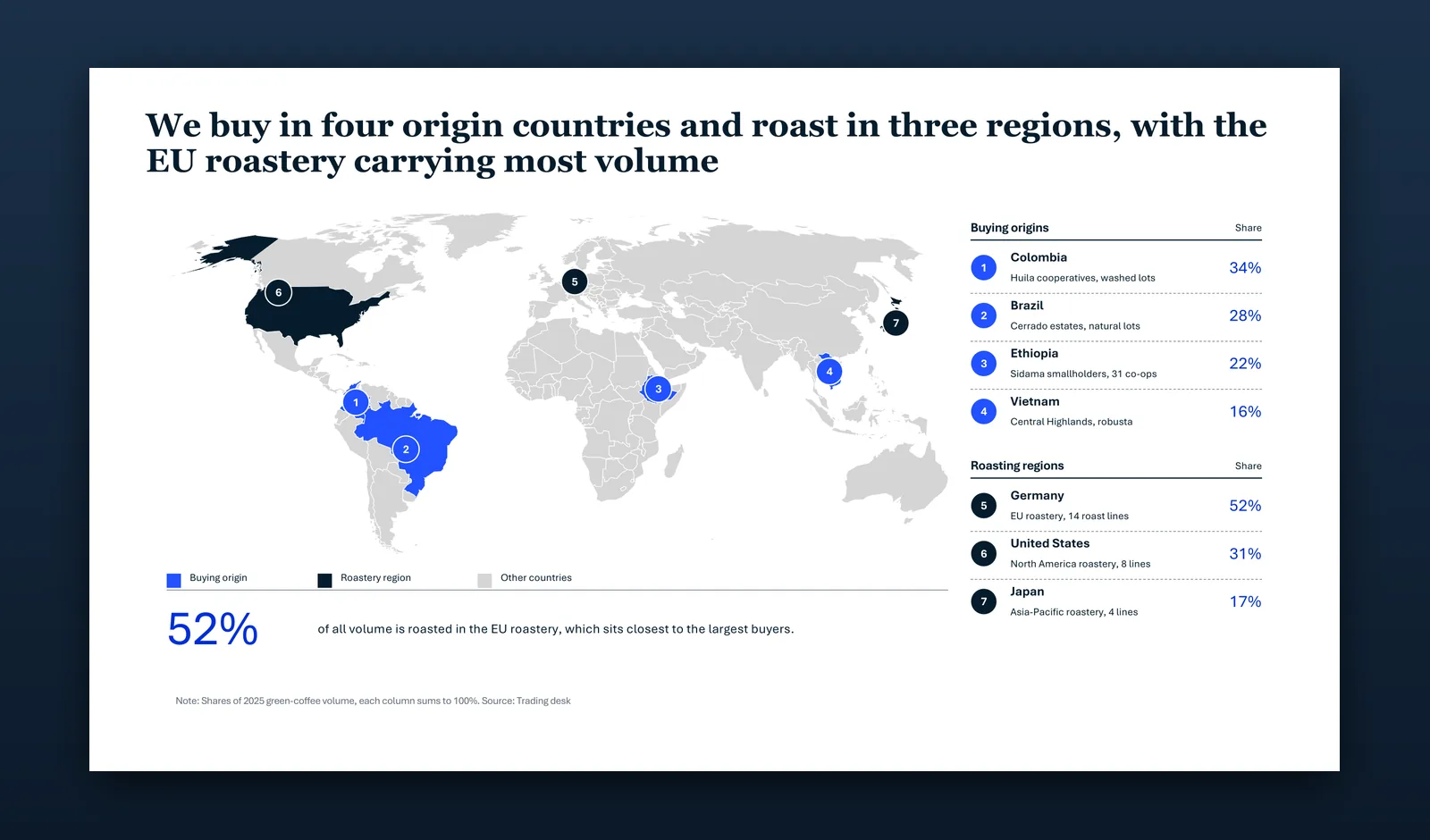
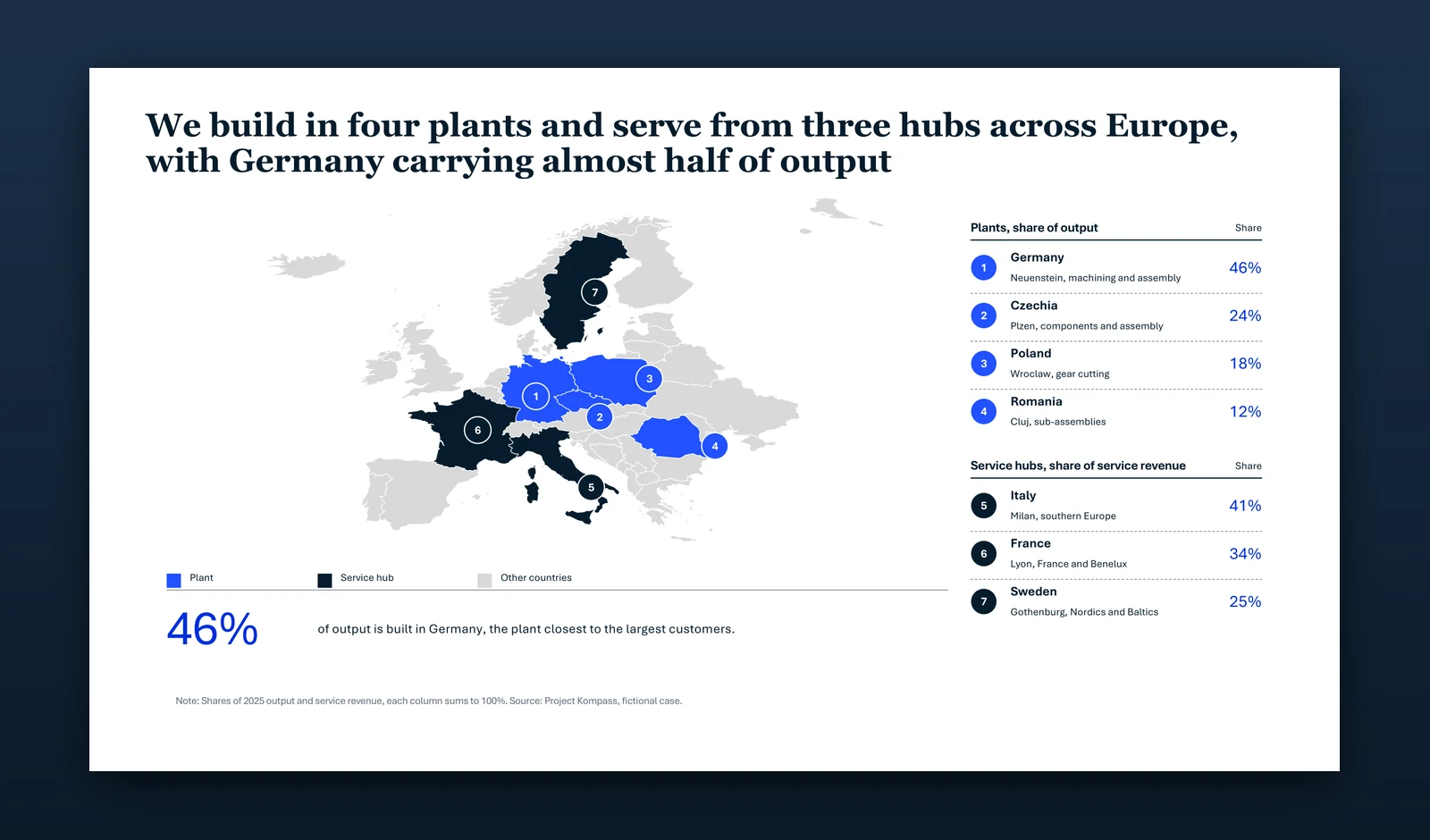
With a static pack, those are your edits: find a Europe map, recolour it country by country and move every pill. In Decky AI you ask for it in the chat, and the template changes with your story.
Do consulting templates really move to your company master?
Colours often do. Fonts much less so, and anything that is not a placeholder stays exactly where it was drawn. That is the clean-up you do slide by slide.
The test used a navy, a green and a red consulting master, with third-party text removed and a visible accent colour on navy and red (theirs was white). All three went onto each file through PowerPoint’s own apply-template command, and the exported slides were measured: how much of the coloured area sits on the master’s own hues, and how much of the text came out in the master’s fonts. The test also counted the slides with a real title placeholder, which is what lets a title move to the master’s position. Decky AI’s templates went through its own placing step instead.
| File tested | Colours followed | Fonts followed | Slides with a real title |
|---|---|---|---|
| Slide Science Free sample | 100% | 64 to 72% | 20 of 22 |
| Slideworks Consulting Toolkit, free sample | 96 to 99% | 33 to 41% | 26 of 28 |
| TemplatePlan Consulting Master Slides 2025, paid | 85 to 100% | 0 to 23% | 195 of 231 |
| StrategyU Crimson, free | 2 to 4%* | 11 to 49% | 123 of 123 |
| Deckary starter pack and board report, free | under 1%* | 0% | 0 of 13 |
 Decky AI Library templates | 100% | 96 to 100% | 322 of 323 |
*On the green and navy masters. Crimson and orange sit close to the red master’s hues, so both score high there by coincidence. For Decky AI, Slideworks, Slide Science and TemplatePlan the colour column counts slides without pictures; StrategyU and Deckary count all their slides. Decky AI’s 100% covers the 248 of its 323 slides with no picture, and with all 323 counted it lands at 89 to 94%. Free samples can differ from paid libraries, and both Deckary and Slideworks offer theme handling inside their add-ins, which a file test does not reach.
Slide Science and Slideworks hold colour well through apply-template. The largest gap is in fonts, and you can see the overall effect side by side.

Decky AI’s templates hold because a build check refuses any template with a hard-coded colour or a literal font, and because inserting one is a placing step rather than a paste: the title goes to your title placeholder, the note and page number use your layout’s footer placeholders where it has them, and the body fits your content area.

Can you use AI on top of consulting templates?
It depends on the licence, so read it before you paste. Slideworks states its position directly: its terms say you may not use its service “as training data or input in any other form or shape to AI tools” without written permission, and they say the same of its add-in’s output, apart from the add-in’s own AI features.
Others draw the line elsewhere. Slide Science describes a beta Claude skill for its pack, and StrategyU sells an AI Skills pack. Flevy’s terms bar training AI models on its documents. SlideModel describes its slides as Copilot-ready.
So if you own Slideworks slides, without its written permission you adapt them to your content by hand: handing them to ChatGPT, Claude, Copilot or Decky AI to fill is what those terms bar. Its add-in lists AI search and layout suggestions, not filling. That is our reading of the terms as of 16 November 2026, not legal advice.
Decky AI’s library has its own licence. You use it in presentations you make with Decky AI, and a Decky Library purchase also covers other presentation software.
What does Decky AI add on top of templates?
Decky AI gives you the static templates and lets you use them inside AI, so they adapt to your content. There are four ways to work, and you can move between them in the same conversation, in the deck you have open.
- Fill a template. Pick one from the library, or let Decky AI choose, and it fills it from your material.
- Adapt it. Ask for different columns, another row, a new takeaway or a different map.
- Build a new slide for the message. When nothing fits, Decky AI builds the page from your brief, or from a sketch, with native charts and an action title.
- Reuse your own. Save your best slides and components to your library. Decky AI finds them by meaning. A saved component is rewritten for the slide you are on, and a saved slide comes in as a copy you can then ask it to change.
This slide has no stock layout at all. It was built with Decky AI from a typed brief, on the navy master:
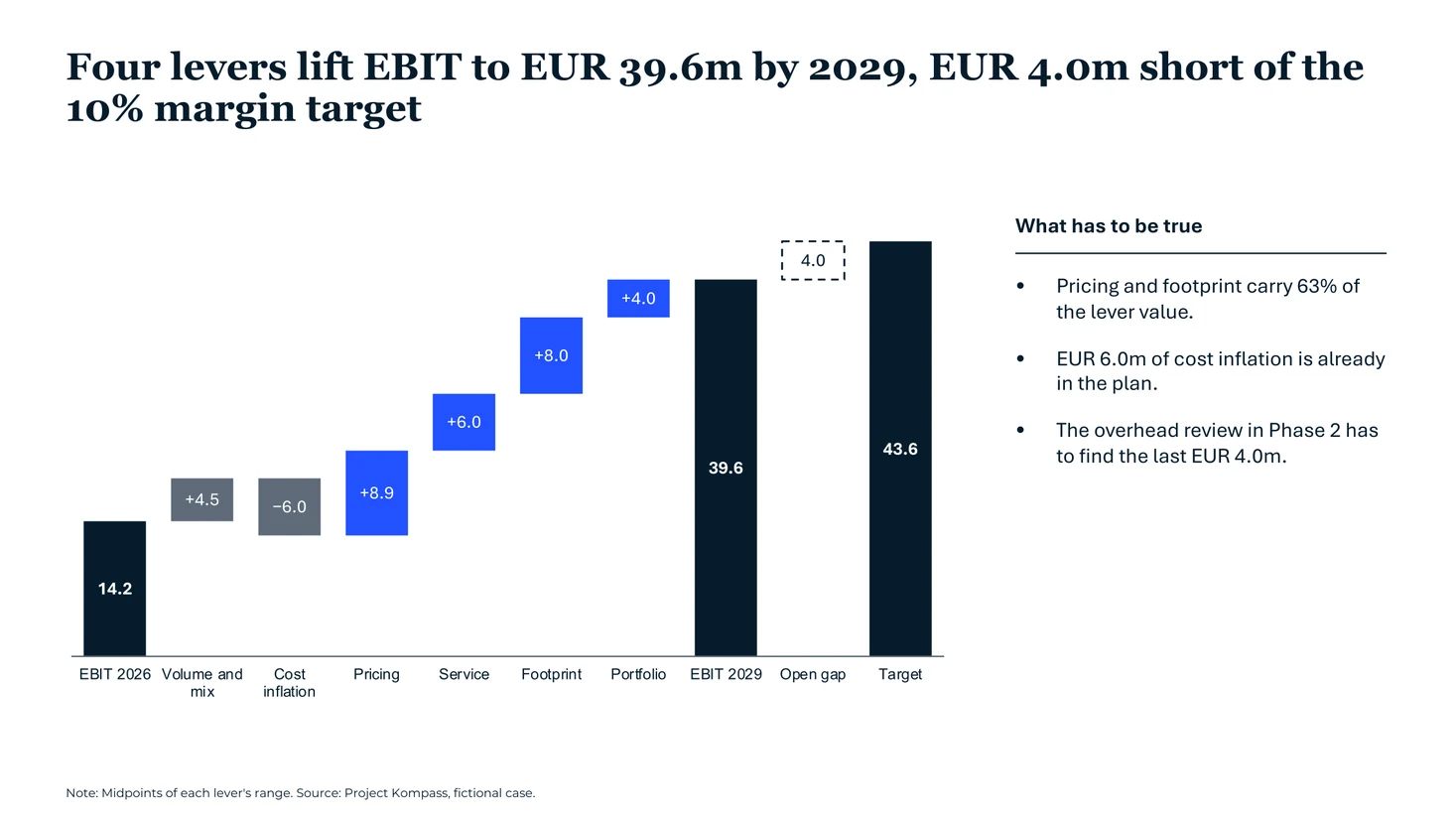
Templates gave consultants a strong start for years, and they still do. Decky AI keeps that start, and lets you go on changing the slide from there. Try it against your own template with the message that never fits a stock slide.
Frequently asked questions
Am I allowed to change library templates with Decky AI?
Yes. Library templates are licensed for your own presentations made with Decky AI, and its agent is allowed to fill them, change their structure and rewrite them for your context.
Can Decky AI change a template, or only fill it?
Both. It fills a template from your material, then changes whatever your message needs: columns, rows, the takeaway or the map itself, using native map assets you can edit in PowerPoint.
Do library templates work on my company master?
Yes. Colours and fonts come from your master, the title goes to your title placeholder and the body fits your content area. In our test on three masters, all of the coloured area on slides without pictures followed the master, and 96 to 100% of the text took its fonts.
Can Decky AI work with my own slides?
Yes. Save your best slides and components to your library and Decky AI finds them by meaning. A saved component is rewritten for the slide you are on, and a saved slide comes in as a copy you can then ask it to change.
Does Decky AI replace a template library?
It includes one. Decky AI has fillable templates and whole decks, components for building a page up, and an agent that adapts a template or builds a new slide. The difference shows when a slide does not fit your message: you ask for the change instead of rebuilding it.

Maximilian Nitsche · Founder, Decky AI
I built Decky AI so anyone can put an MBB-level slide together and still be done before 8pm. I write here about the craft of consulting decks, and about what we ship.